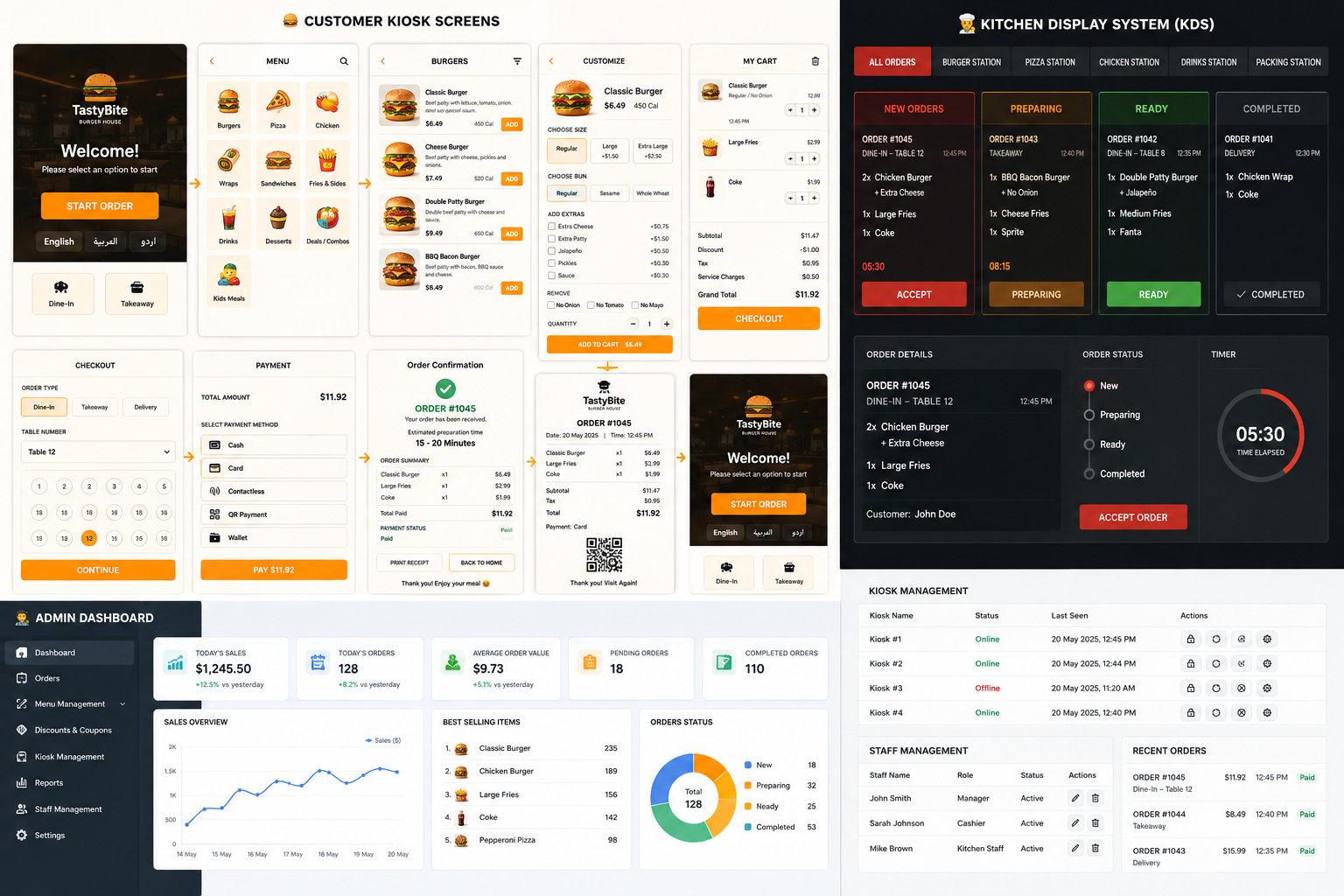
The restaurant industry is changing rapidly as businesses look for better ways to serve customers, reduce waiting time, improve order accuracy, and manage busy hours more efficiently. Restaurant Self-Service Kiosk Software is one of the technologies helping businesses achieve these goals by giving customers direct control over the ordering process. Instead of waiting at a counter and depending completely on staff, customers can use a touchscreen kiosk to explore the menu, select products, customize their orders, review the cart, apply available offers, and complete payment.
What Is Restaurant Kiosk Software?
Restaurant Kiosk Software is a digital ordering solution designed specifically for touchscreen kiosk machines. It provides customers with an interactive digital menu and guides them through the complete ordering process. The system can be connected with restaurant operations so that orders placed by customers can be processed by the kitchen and relevant staff. This creates a connected workflow between the customer, ordering system, kitchen, and payment process.
A Complete Digital Ordering Experience
The kiosk starts with a simple welcome screen where customers can begin their order with a touch. After entering the system, customers can browse different menu categories such as burgers, meals, combos, drinks, snacks, and desserts. Each category can contain product images, names, prices, and descriptions, allowing customers to understand the available options before making a selection. Once a product is selected, customers can choose available customizations and then add the item to their cart.
Product Customization
Product customization is an important part of modern restaurant ordering. Customers may want to select different options, add-ons, quantities, or other available choices. Instead of explaining these requirements verbally to a cashier, the kiosk allows customers to select their preferences directly from the screen. This makes the ordering process easier and can help reduce mistakes caused by communication problems.
Smart Cart Management
After selecting products, customers can open their cart and review the complete order before checkout. They can check selected items, quantities, prices, and available modifications. This gives customers an opportunity to verify their order before confirming it. A clear cart interface also makes the final ordering process more transparent and user-friendly.
Offers and Coupons
Restaurant businesses frequently use discounts and promotional campaigns to attract customers. Kiosk Software can provide support for offers and coupon codes directly within the ordering process. Customers can apply eligible promotions while placing their orders, while restaurants can use these features to promote specific products, campaigns, or special deals.
Digital Payment Process
Payment is another important part of the kiosk experience. Once the customer has reviewed the order, the system can provide available payment methods and guide the customer through the final transaction. Depending on the restaurant's hardware and payment infrastructure, the kiosk can be integrated with supported payment solutions to provide a convenient checkout experience.
Kitchen Integration
A restaurant kiosk becomes more useful when it is connected with kitchen operations. Once an order is confirmed, relevant order information can be transferred to the kitchen or restaurant management system. This reduces the need for staff to manually re-enter customer orders and creates a smoother workflow from ordering to preparation. The overall process can work as Customer → Kiosk → Order Processing → Kitchen → Order Completion.
Real-Time Updates
Real-time communication between different parts of the restaurant system can help staff stay updated with current orders and activities. When information is synchronized between the kiosk, order management system, and kitchen, staff can respond to new orders more efficiently. Real-time updates can also help create a more organized environment during busy periods.
Reducing Queues and Waiting Time
One of the biggest benefits of self-service ordering is the ability to reduce pressure on traditional cashier counters. During peak hours, restaurants can experience long queues because multiple customers are waiting to place their orders. Self-service kiosks provide additional ordering points, allowing customers to place orders independently and helping distribute customer traffic across different channels.
Improving Order Accuracy
Manual order entry can sometimes result in incorrect products, quantities, or customizations. A kiosk allows customers to select their requirements directly from the interface, reducing the amount of information that needs to be communicated verbally. Customers can also review their complete cart before confirming the order, providing another opportunity to identify and correct mistakes.
Better Customer Experience
The customer experience is at the center of a successful kiosk system. The interface needs to be simple enough for first-time users while still providing all the necessary ordering features. Clear navigation, large touch-friendly buttons, attractive product images, readable prices, organized categories, and straightforward checkout screens can make the overall experience easier and more enjoyable.
Restaurant Operations Become More Organized
Kiosk Software can also support restaurant staff by reducing repetitive manual tasks. Instead of employees spending most of their time entering customer orders, they can focus on food preparation, customer assistance, order fulfillment, and other operational responsibilities. This can help restaurants use their staff more effectively while maintaining a smooth customer flow.
Flexible Menu Management
A digital menu provides greater flexibility compared with traditional printed menus. Products, categories, prices, images, offers, and other menu information can be managed digitally. Restaurants can update their offerings according to business requirements, seasonal products, promotions, or changes in pricing without having to replace printed materials.
Designed for Different Restaurant Businesses
Restaurant Self-Service Kiosk Software can be adapted for different types of food businesses, including fast-food restaurants, cafes, food courts, quick-service restaurants, takeaway outlets, and large dining locations. Each business may have a different menu structure and ordering workflow, so the software can be customized according to its requirements.
Security and System Management
A professional kiosk solution also needs proper system management and controlled access to administrative functionality. Different parts of the system can be managed according to defined permissions and operational requirements. Secure communication, controlled access, proper database management, and reliable transaction handling are important for maintaining a dependable restaurant ordering environment.
Technology Behind the System
Developing restaurant kiosk software requires a combination of frontend, backend, database, and integration technologies. The frontend needs to provide a responsive touch-friendly interface, while the backend manages products, categories, orders, customers, payments, offers, and other business logic. Database technology is used to store and retrieve important information, while APIs or other integration methods can connect the kiosk with restaurant systems and external services.
Why Restaurants Need Self-Service Technology
Customer expectations are changing, and people increasingly prefer fast and convenient digital experiences. Restaurants that provide self-service options can offer customers more control over their ordering journey. Kiosk technology can also help businesses handle higher customer volumes without relying entirely on additional cashier stations. This makes self-service ordering an attractive solution for restaurants looking to improve both customer service and operational efficiency.
My Restaurant Kiosk Software Project
I developed a Restaurant Self-Service Kiosk Software with a complete customer ordering workflow, including a welcome screen, digital menu categories, product listing, product customization, cart management, offers and coupons, checkout, payment options, kitchen integration, and real-time updates. The system was designed with a focus on usability, clean navigation, touch-friendly interaction, and an efficient ordering experience.
Conclusion
Restaurant Self-Service Kiosk Software is more than just a touchscreen menu. It can become an important part of a restaurant's digital infrastructure by connecting customers, orders, payments, kitchen operations, and management processes. By providing self-service ordering, digital menus, customization, cart management, promotions, payment integration, and kitchen connectivity, kiosk technology can help restaurants create faster and more organized operations while giving customers a convenient way to order. As restaurants continue adopting digital solutions, self-service kiosk systems will remain an important technology for improving the overall ordering experience and supporting the future of food-service businesses.